Exploring archived content
Use the WARC content dashboard to understand which content types occur in the analysed web archive. It counts mimetypes, groups them into attention categories and lists the response and revisit records associated with them.
Purpose
This dashboard helps you recognise the composition of a web archive and find content types that may warrant closer examination. Start with the graph for an overall distribution, use the attention table to review categories and consult the content table for individual records.
When to use this page
Open WARC content when you need to:
- identify common or uncommon mimetypes;
- compare the number of records for different content types;
- distinguish content marked as meaningful, supporting or unclassified by Warqube; or
- find response and revisit records with a particular mimetype, file name or target URI.
Understanding the results
WARC content graph
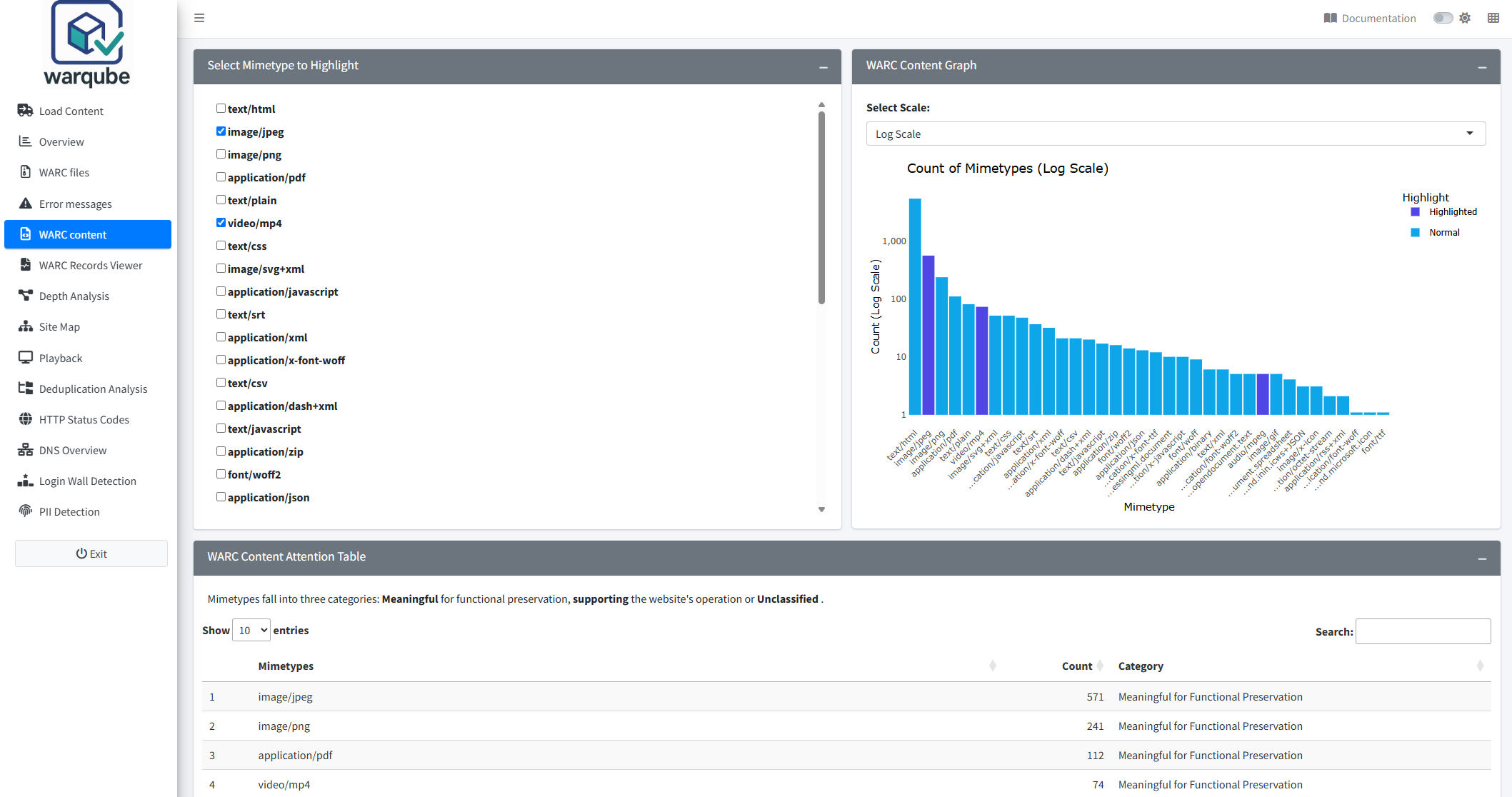
WARC Content Graph shows the number of response records for each recorded mimetype. Point to a bar to see the full mimetype and record count.
Long mimetype labels are shortened on the horizontal axis. The full value remains available when you point to the bar.
To compare selected mimetypes:
- Select one or more values under Select Mimetype to Highlight.
- Review the highlighted bars in WARC Content Graph.
- Select Normal Scale to compare counts directly or Log Scale to make large differences in count easier to view.
Highlighting changes the appearance of selected bars. It does not filter or remove the other mimetypes.
WARC content attention table
WARC Content Attention Table lists each mimetype found in response records, its count and one of three categories:
- Meaningful for Functional Preservation identifies mimetypes included in Warqube’s configured list of potentially meaningful objects, such as documents, images, audio and video;
- Supporting/Technical identifies configured types used to support a website or provide record context, including HTML, CSS, JavaScript, JSON, XML and plain text; and
- Unclassified/Other contains every mimetype that does not exactly match either configured list.
These categories organise the results for review. They do not determine the preservation value of an individual record.
WARC content table
WARC Content Table lists response and revisit records with a recorded mimetype. It displays:
- File Name;
- Record Type;
- Mimetype;
- WARC Record Date;
- WARC Record ID;
- WARC Refers To; and
- WARC Target Uri.
Use the table search field to find values across the displayed columns. The table initially shows 15 rows per page. Select a column heading to change the sort order.
Interpreting common findings
- A high count means that many response records report that mimetype. It does not show how many distinct files, target URIs or captured resources they represent.
- A mimetype in Meaningful for Functional Preservation matches a configured list of content that may be meaningful on its own. Warqube does not assess whether every matching record requires preservation action.
- A mimetype in Supporting/Technical matches a configured list of content relevant to website operation or record context. This label does not mean that the content can be discarded.
- Unclassified/Other means that the mimetype does not match either configured list. It does not mean that the type is invalid or unsupported.
- A revisit row can contain WARC Refers To, which identifies the related record value stored in the WARC metadata. The dashboard does not confirm that the referenced record is available or playable.
- Differences between the graph and detail-table results can occur because the graph counts response records only, while the table also includes revisit records.
Limitations
- The graph and attention table include only response records with a non-empty mimetype. The content table includes response and revisit records with a non-empty mimetype. Other WARC record types do not appear.
- For the graph and attention table, Warqube removes parameters following a semicolon in a mimetype before grouping values. The detail table displays the stored mimetype value.
- Category assignment uses exact matches against fixed configured lists. It does not inspect the payload or verify that its content matches the reported mimetype.
- Counts represent WARC records, not distinct resources, files or target URIs.
- Highlighting mimetypes changes the graph only. It does not filter the attention table or content table.
- The dashboard does not open a selected content-table row in a record viewer.
- Although Refresh Data is visible, the source code does not confirm that selecting it forces the displayed results to be reloaded.
Related dashboards
- Understanding the Overview dashboard summarises the loaded web archive.
- Inspecting WARC files provides file-level information.
- Inspecting archived records lets you filter records and inspect their headers and payload content.
Next steps
Continue to Inspecting archived records to examine the headers and payload of individual records identified during your content review.