Identifying duplicate files
Use Deduplication Analysis to find response records that share a stored payload digest within a WARC file or with records from an earlier crawl date. The dashboard identifies repeated payloads; it does not determine whether two WARC files are identical.
Purpose
This dashboard helps you assess how often captured content occurs more than once. You can compare payload uniqueness across WARC files and crawl dates, identify URLs associated with repeated content and examine repeated captures of the same URL.
When to use this page
Open Deduplication Analysis when you need to:
- estimate how much response content is repeated within individual WARC files;
- see how much content on a later crawl date was already present on an earlier crawl date;
- find different URLs that share a payload digest; or
- find repeated captures of the same URL and payload within a WARC file.
Understanding the results
Run the analysis
- Open Deduplication Analysis.
- Under HTTP status filter, select All responses, 2xx – Success, 3xx – Redirects, 4xx – Client errors or 5xx – Server errors.
- Select Run analysis.
- Review the charts, summary table and URL overview.
Changing HTTP status filter refreshes the results. Every result on the page uses the selected status-code group.
Review payload uniqueness
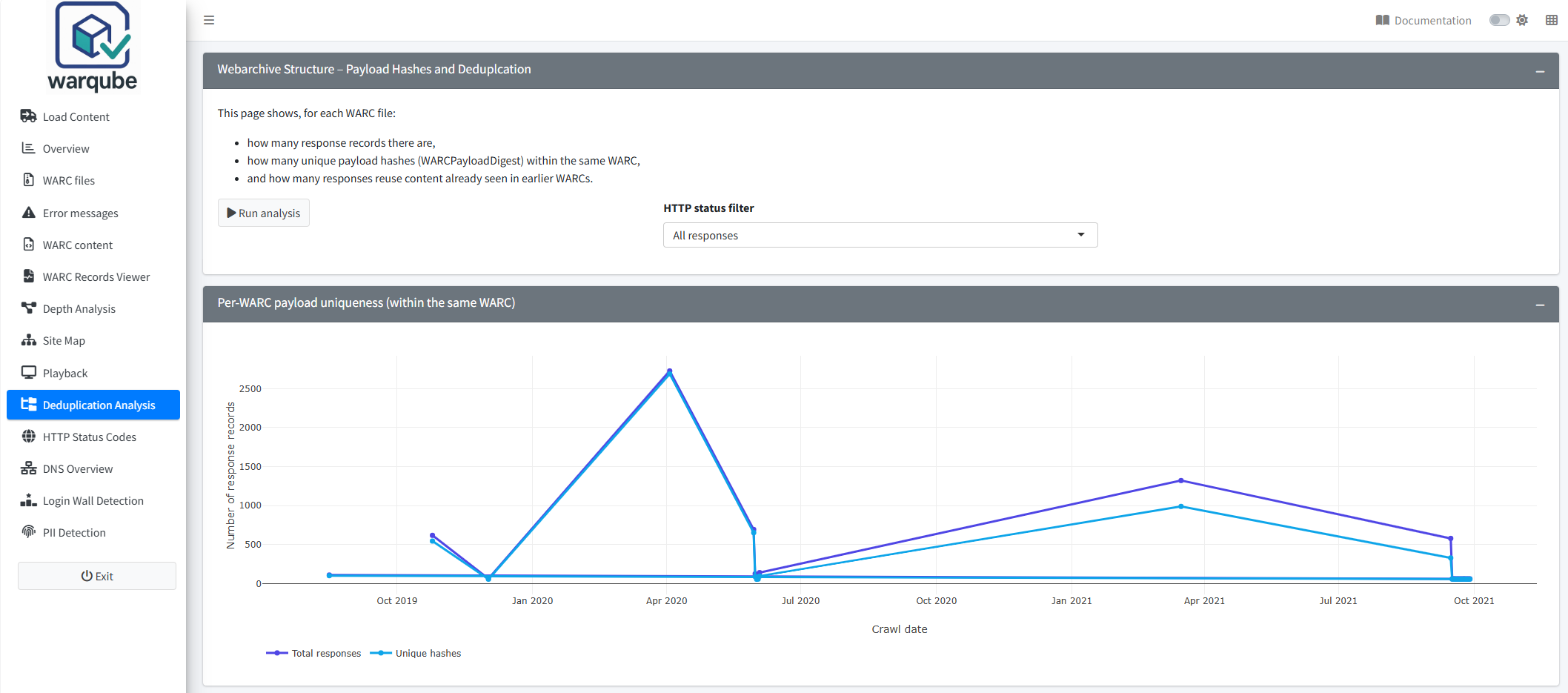
Per-WARC payload uniqueness (within the same WARC) compares the number of response records with the number of distinct, non-empty payload digests. The chart groups results by crawl date. If a crawl date contains several WARC files, point to a marker to see their names and count.
The chart adds the distinct-digest count from each WARC file. A digest that occurs in two different WARC files can therefore contribute once for each file.
Hash / deduplication summary per WARC shows the response count, distinct payload-digest count and calculated within-file duplicate count for every WARC file. The duplicate count is the response count minus the distinct non-empty digest count. Records without a payload digest therefore contribute to this calculated count and cannot be confirmed as duplicate content from this table alone.
Review content seen on earlier crawl dates
Share of responses already seen in earlier WARCs shows, for each WARC file, the percentage of response records whose payload digest also occurs on an earlier crawl date. Point to a marker to see the WARC file, crawl date, number of matching records and percentage.
Warqube treats a digest as previously seen only when its earliest crawl date is before the current record’s crawl date. Records with the same earliest crawl date are not counted as previously seen, even if they belong to different WARC files.
Examine duplicate URLs
The tables under Duplicate content – URL overview initially show 25 rows per page. Use the table search and sorting controls to inspect the results.
- Within same WARC (by payload) lists payload digests that occur more than once in one WARC file and shows the associated target URLs.
- Exact duplicates (URL + payload) lists URL and payload-digest combinations that occur more than once in one WARC file.
- Vs earlier WARCs lists responses whose payload digest first occurs on an earlier crawl date and shows that first date.
Interpreting common findings
- A wide difference between response count and distinct payload-digest count can indicate repeated content. Records without a payload digest also widen this difference, so confirm the detail in the URL tables before drawing a conclusion.
- One payload digest associated with several URLs indicates that Warqube has recorded the same digest for content captured at those URLs. This can help you find repeated assets or pages, but the dashboard does not identify why they share a digest.
- A repeated URL and payload combination indicates that the same combination occurs more than once within one WARC file.
- A high percentage in Share of responses already seen in earlier WARCs means that many response records in that WARC file share a digest with content from an earlier crawl date. It does not mean that the WARC files themselves are duplicates.
- An empty detail table means that no matching rows were returned for that view and status filter. Warqube displays no separate message for an empty result.
Limitations
- The dashboard analyses response records only. It does not include revisit records.
- Warqube compares the payload digests stored in the analysis database. This dashboard does not recalculate or verify those digests against the archived payloads.
- Records without a payload digest affect the calculated within-file duplicate count but do not appear in the duplicate URL tables.
- Comparisons with earlier content use crawl dates. Records from the same date are not treated as earlier than one another, and records without a usable crawl date cannot be placed in this sequence.
- The earlier-content chart connects results for individual WARC files across crawl dates. The line does not represent one continuous collection-wide series.
- Applying an HTTP status filter changes both the records being assessed and the earliest occurrence used for comparison.
- The dashboard does not test whether complete WARC files are byte-for-byte identical.
- The source code defines no expected or acceptable level of duplicate content.
Related dashboards
- Inspecting WARC files provides file-level crawl dates and other information used to distinguish WARC files.
- Exploring archived content summarises response and revisit records by content type.
- Inspecting archived records lets you examine individual records and their metadata.
Next steps
Continue to Exploring HTTP status codes to examine the responses returned by the archived web servers.