Detecting login walls
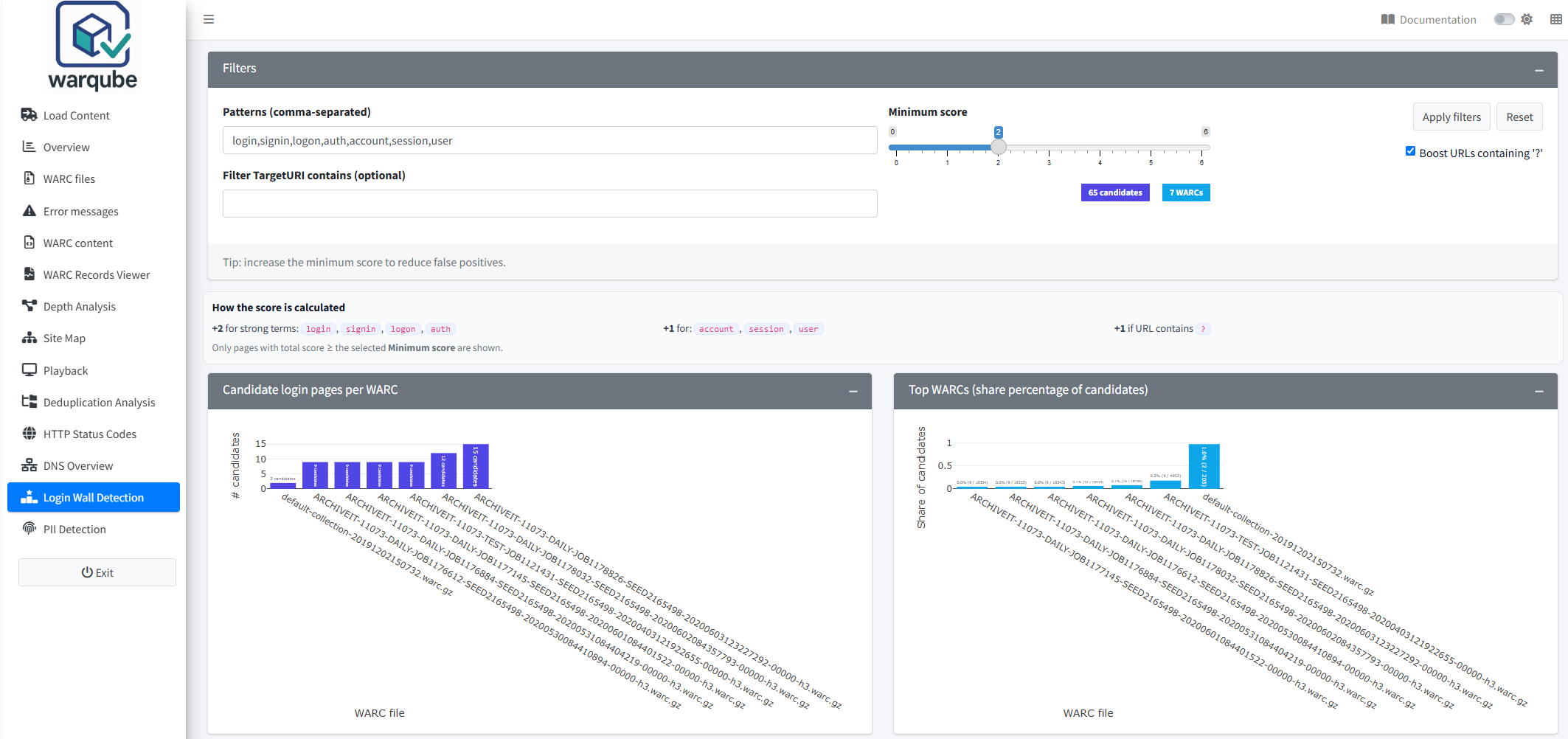
Use Login Wall Detection to find WARC records whose target URIs contain terms associated with login or account access. Treat every result as a candidate: Warqube does not confirm that a login wall was present.
Purpose
This dashboard helps you identify records that may lead to login pages or access barriers. You can adjust the URI patterns, raise or lower the minimum score, compare candidates across WARC files and export the results for further review.
When to use this page
Open Login Wall Detection when you need to:
- find target URIs containing login-related terms;
- identify WARC files with many candidate records;
- compare the proportion of candidates between WARC files;
- narrow the results to target URIs containing a particular value; or
- export candidate record identifiers, target URIs and scores.
Understanding the results
Review the initial candidates
Warqube initially uses these patterns: login,signin,logon,auth,account,session,user. It sets Minimum score to 2 and selects Boost URLs containing ‘?’. The results load automatically when the analysis database becomes available.
To review the initial results:
- Open Login Wall Detection.
- Review the candidate and WARC counts beside Minimum score.
- Compare the two WARC-file charts.
- Review Details: candidate TargetURIs across all WARCs.
Candidate login pages per WARC counts candidate records in each WARC file. Top WARCs (share percentage of candidates) divides that candidate count by the total number of WARC records associated with the file. Point to a bar to see its count or percentage.
Adjust the filters
To change the candidate selection:
- In Patterns (comma-separated), enter the URI terms you want to match.
- In Filter TargetURI contains (optional), enter an additional value if every returned target URI must contain it.
- Select or clear Boost URLs containing ‘?’.
- Set Minimum score between 0 and 6.
- Select Apply filters.
- Review the updated candidate counts, charts and details table.
Pattern and additional-filter matching is case-insensitive. If you provide several patterns, a target URI must contain at least one of them. A URI that contains several patterns receives points for every matching pattern.
Despite its label, Boost URLs containing ‘?’ also restricts the results. When selected, every candidate must contain ? in its target URI and receives one additional point. When cleared, ? is neither required nor scored.
Warqube calculates the score as follows:
| Match | Score |
|---|---|
Each configured pattern login, signin, logon or auth that matches | +2 |
| Each other configured pattern that matches the target URI | +1 |
A target URI containing ?, when Boost URLs containing ‘?’ is selected | +1 |
Only records meeting Minimum score appear. Raising the minimum can reduce the number of weak matches, but the source code does not define a score that confirms a login wall.
Select Reset to restore the default patterns, minimum score, optional filter and ? setting.
Review and export the details
The details table contains the WARC file, WARC record identifier, target URI, score and first matching pattern. If several configured patterns match, the score includes all of them, but the match_type column shows only the first matching pattern in the configured order.
The table initially displays 10 rows per page. You can search, sort, copy the displayed data, export it as CSV or Excel, and choose to display 10, 25, 50, 100 or 250 rows per page.
To download the candidate data as a CSV file:
- Apply the filters you want to use.
- Select Download CSV.
- Save the generated
login_candidates_YYYY-MM-DD.csvfile.
The downloaded file contains the candidates returned by the applied filters.
Interpreting common findings
- A high score means that the target URI matches several configured signals or higher-weighted terms. It does not confirm that the record contains a login page.
- A high candidate count in one WARC file can help you focus further review on that file. Larger WARC files can also contain more candidates simply because they contain more records.
- A high candidate share means that candidates form a larger proportion of all records associated with that WARC file. The denominator is not limited to response records or web pages.
- A target URI containing a login-related term can refer to a page, asset, parameter or another resource. Review the record before classifying it as a login wall.
- Few or no candidates can result from restrictive patterns, the
?requirement or a high minimum score. It does not establish that the archived site had no access barriers.
When the current filters return no candidates, both charts display:
No candidates found with current filters.
The details table displays:
No candidates found.
To broaden the results:
- Lower Minimum score.
- Clear Boost URLs containing ‘?’ if candidates do not need a query string.
- Remove or broaden Filter TargetURI contains (optional).
- Review the comma-separated patterns.
- Select Apply filters.
If the database is not yet available, the candidate-share chart can display:
Waiting for database...
Wait until an analysis database has loaded, then select Apply filters.
Limitations
- Warqube matches text in target URIs. It does not inspect archived page content, forms, authentication responses or access-control behaviour.
- A candidate is not a confirmed login wall. The source code provides no automatic confirmation step.
- The selection is not restricted by WARC record type, content type or HTTP status code. Any record with a matching non-empty target URI can appear.
- Boost URLs containing ‘?’ acts as both a requirement and a score increase when selected.
- The candidate-share denominator includes all records associated with the WARC file, not only records that could represent web pages.
- Pattern matching uses substrings. A term can therefore match as part of a longer, unrelated value and produce a false positive.
- The score adds points for every configured pattern found in the URI. The
match_typecolumn reports only the first matching pattern. - Minimum score is limited to 0–6, but a URI can receive a score above 6 by matching several patterns.
- The source code defines no expected candidate count, acceptable candidate share or score that proves the presence of a login wall.
Related dashboards
- Inspecting archived records lets you examine the metadata of candidate WARC records.
- Replaying archived websites can help you inspect replayable archived pages associated with candidate URLs.
- Exploring HTTP status codes summarises response status codes across the web archive.
Next steps
Continue to Detecting personally identifiable data to review archived records for configured personally identifiable information patterns.