Analysing crawl depth
Use Depth Analysis to compare the URL-path depth of response records across crawl dates, crawl types and WARC files. Start by selecting Analyse depth; Warqube then displays the depth charts and file-level statistics.
Purpose
This dashboard helps you recognise how archived URLs are distributed across path levels. It can highlight changes in maximum depth, concentrations of records at particular levels and differences between two crawl types or WARC files.
Warqube measures depth from the path in each HTTP or HTTPS target URI. The root path has depth 0, /section has depth 1 and /section/page has depth 2. This is URL-path depth, not the number of hyperlinks followed from a seed page.
When to use this page
Open Depth Analysis when you need to:
- compare path-depth distributions over time;
- identify the maximum recorded path depth for each crawl date and crawl type;
- review depth statistics for individual WARC files; or
- compare record counts by depth and top-level path between two crawl types or WARC files.
Understanding the results
Crawl-depth overview
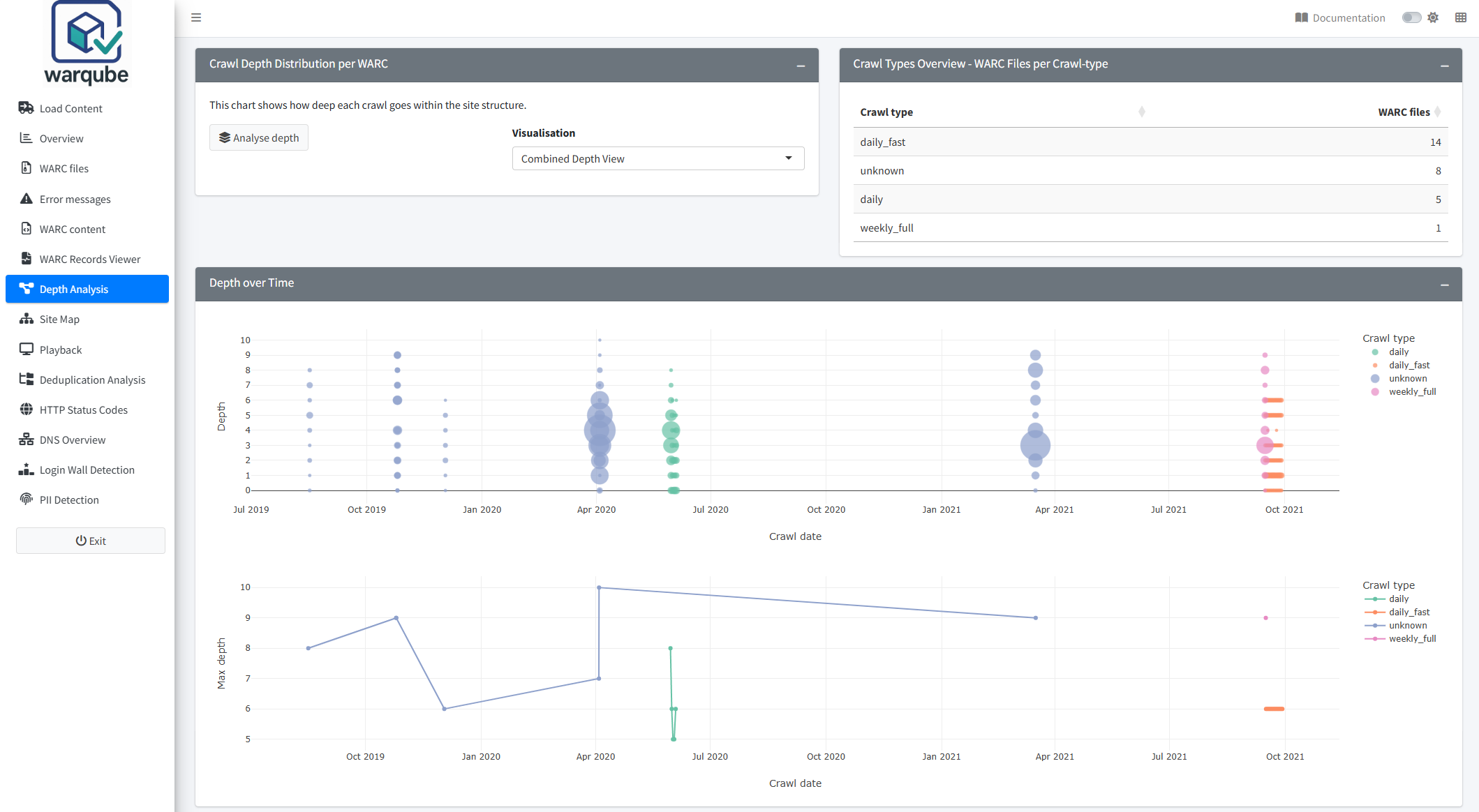
Crawl Types Overview - WARC Files per Crawl-type lists the recorded crawl types and the number of WARC files assigned to each. Files without a crawl type appear as unknown.
To generate the depth results:
- Open Depth Analysis.
- Select Analyse depth.
- Select a value under Visualisation.
- Review Depth over Time and Depth statistics per WARC file.
The available visualisations are:
- Depth Bubble Map, which plots crawl date against depth. Marker size represents the number of response records and colour represents crawl type;
- Max Depth Timeline, which plots the maximum depth for each crawl date and crawl type; and
- Combined Depth View, which displays both charts.
Point to a bubble to see the crawl date, depth, response-record count and crawl type. Point to a timeline marker to see the date, crawl type, maximum depth and total response-record count.
Depth statistics per WARC file contains WARC filename, Crawl date, Crawl type, Depth and Records. Each row reports the number of response records at one depth for one WARC file. The table initially shows ten rows per page.
Depth Delta Explorer
Depth Delta Explorer (A vs B) compares response-record counts at each depth and top-level path. You can compare two recorded crawl types or two WARC files.
To compare two selections:
- Under Compare by, select Crawl type or WARC file.
- Choose Selection A and Selection B.
- Select a Mimetype filter.
- Set Min depth to exclude shallower path levels if required.
- Set Top folders (visual) to the number of top-level paths to retain.
- Under Show, select the direction of change.
- Select Analyse delta.
- Review the heatmap and table.
The mimetype filters include HTML; HTML with CSS and JavaScript; HTML with JSON and XML; PDF, image, audio and video content; or all response records.
Warqube derives a top folder from the first segment of the URL path. A root or empty path appears as ROOT. The delta is calculated as the record count in B minus the record count in A:
- Only in B (added) retains positive differences;
- Only in A (missing) retains negative differences; and
- Net delta (B-A) retains positive, negative and zero differences.
The heatmap shows the delta for each retained top folder and depth. The table also shows the counts for A and B, the signed difference and its absolute size. It initially displays 15 rows per page.
If fewer than two usable crawl types are available, Warqube displays:
Need at least 2 CrawlTypes.
If fewer than two WARC files are available, it displays:
Need at least 2 WARC files.
To recover from either result:
- Select the other option under Compare by if it offers at least two choices.
- If neither option offers two choices, use the overview charts and statistics table without running a delta comparison.
The comparison controls appear when the loaded analysis contains at least two eligible choices for the selected comparison type.
Interpreting common findings
- A larger bubble means that more response records occur at that date, depth and crawl type. It does not represent payload size or the number of distinct target URIs.
- A higher point in Max Depth Timeline means that at least one response URI reached that URL-path depth. It does not show how many records reached the maximum.
- A concentration at depth 0 or 1 indicates many root-level or first-level URL paths. It does not establish whether the crawl was shallow, because depth is not calculated from followed links.
- A positive delta means B contains more matching response records than A for that top folder and depth. A negative delta means B contains fewer.
- Only in B (added) can include a path that also occurs in A when its count is higher in B. Only in A (missing) can include a path that also occurs in B when its count is lower in B.
- An
unknowncrawl type means that no crawl-type value is displayed for those WARC files.unknownis included in the overview and depth charts but is not offered for crawl-type delta comparisons.
Limitations
- The analysis includes response records only.
- Depth is the number of
/characters in the extracted URL path after the query string and fragment have been removed. A trailing slash therefore increases the calculated depth. - Target URIs without an extracted HTTP or HTTPS path are assigned depth 0.
- Depth does not represent crawl traversal, click distance, site hierarchy or capture completeness.
- Counts are numbers of WARC response records, not distinct URLs or resources.
- The overview charts combine records that share a crawl date, depth and crawl type across WARC files.
- Top folders (visual) limits both the delta heatmap and the accompanying table. Warqube ranks folders by the total absolute difference after applying the selected direction and filters.
- The interface allows the same value for A and B. Such a comparison cannot reveal a difference.
- If both selections return no matching records for the chosen filters, the delta outputs remain empty and no explanatory message is displayed.
- The source code defines no expected or acceptable crawl depth.
Related dashboards
- Exploring the site structure provides path-based views of the archived website structure.
- Exploring archived content summarises mimetypes and lists response and revisit records.
- Inspecting WARC files provides crawl dates, crawl software and other file-level information.
Next steps
Continue to Exploring the site structure to examine how archived URL paths are distributed within the web archive.