Exploring the site structure
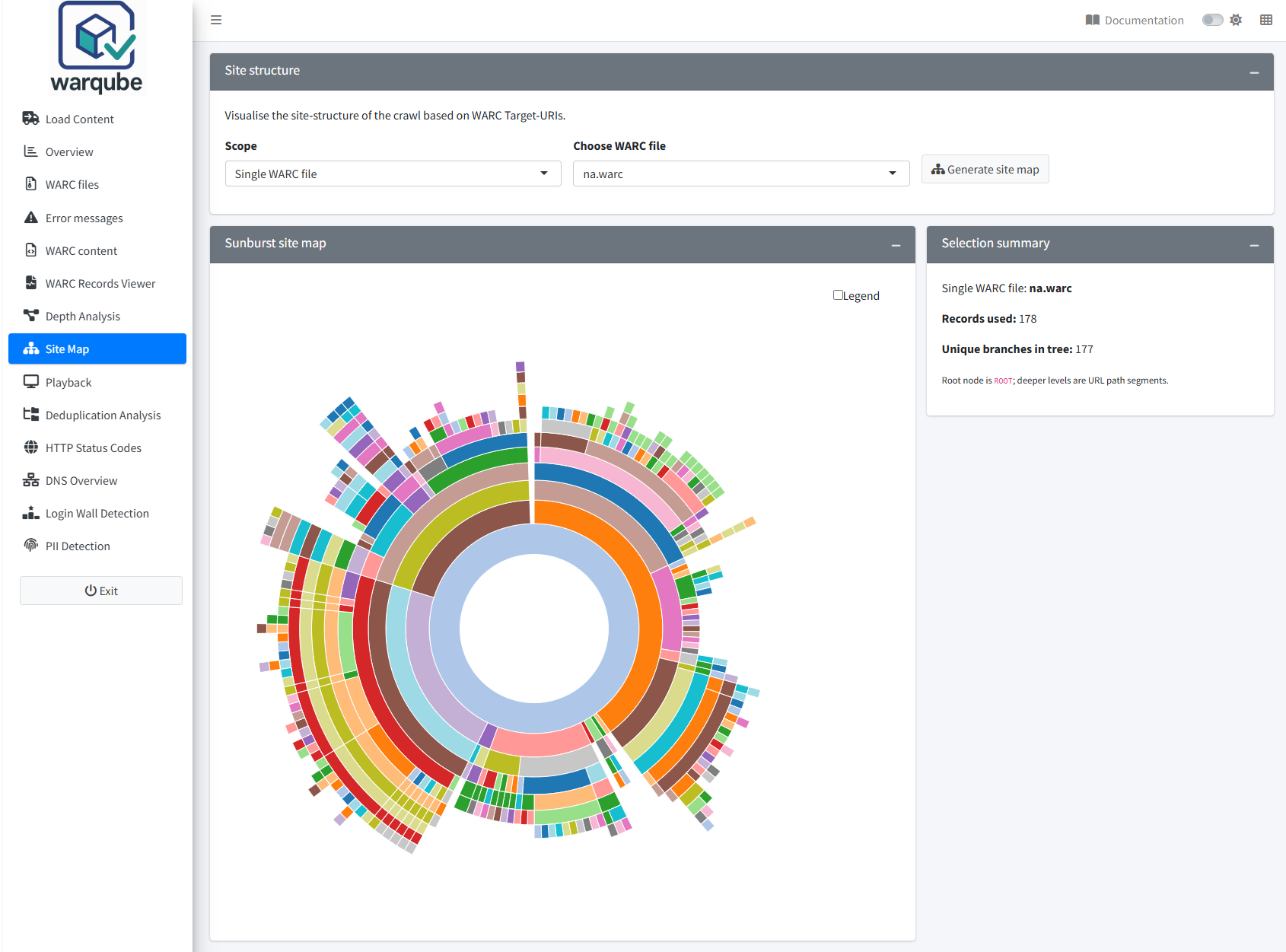
Use Site Map to visualise the URL-path structure of archived response records. Choose whether to include all WARC files, one WARC file or one crawl type, then select Generate site map.
Purpose
The site map helps you recognise common branches and deeper path segments in the analysed web archive. It provides a hierarchical view of recorded URL paths and a summary of the records and branches used to build that view.
Warqube places every path beneath a node named ROOT. Each following level represents another segment of the URL path. The visualisation does not include the URI scheme or host name.
When to use this page
Open Site Map when you need to:
- obtain an overview of archived URL paths;
- compare the structure represented by a single WARC file with the complete analysis;
- focus on records assigned to one crawl type; or
- identify path branches for further depth, content or playback analysis.
Understanding the results
Generate a site map
To generate the visualisation:
- Under Scope, select All WARC files, Single WARC file or Crawl type (daily/weekly).
- If prompted, choose a value under Choose WARC file or Choose Crawl type.
- Select Generate site map.
- Review Sunburst site map and Selection summary.
When you select All WARC files, Warqube uses all response records with an available URL path. Single WARC file restricts the records to the selected file. Crawl type (daily/weekly) restricts them to the selected recorded crawl-type value; the choices are not limited to the words daily and weekly.
Before you generate a map, Selection summary displays:
No sunburst data yet. Click 'Generate site map'.
Select Generate site map to replace this message with the summary for the current selection.
Read the site map
The centre of the sunburst represents ROOT. Rings further from the centre represent successively deeper URL-path segments. The size of a branch reflects the number of response records associated with that path.
Warqube removes the query string and fragment before grouping paths. A root or empty path is placed directly under ROOT.
Selection summary reports:
- the selected scope;
- Records used, which is the number of response records included; and
- Unique branches in tree, which is the number of distinct cleaned paths used to construct the visualisation.
Messages about unavailable choices
If no database is connected, Warqube displays:
No database connected.
To recover:
- Open Load Content.
- Load a Warqube database or complete an analysis.
- Return to Site Map.
The scope controls become available when Warqube has connected to the database.
If Single WARC file has no eligible file, Warqube displays:
No WARC files found in WarcInhoud (RecordType = 'response').
To recover:
- Select All WARC files to confirm whether any response records are available.
- If no map can be generated, retain the message and relevant console output; the source code provides no further recovery procedure.
If Crawl type (daily/weekly) has no available value, Warqube displays:
No CrawlType information found.
To recover:
- Select All WARC files or Single WARC file.
- Generate the map without a crawl-type filter.
The alternative scope can produce a map when eligible response paths are available.
Interpreting common findings
- A large inner branch means that many included response records share its first path segment. It does not show how many distinct target URIs or payloads those records represent.
- A path extending through several rings contains several slash-separated path segments. This is URL-path structure, not evidence that the crawler followed the same number of hyperlinks.
- A difference between scopes shows that their included response records produce different path counts or branches. The site map alone does not explain why.
- Several captures of the same cleaned path increase its branch weight. Query strings and fragments do not create separate branches.
- When the scope covers more than one host, equal paths from those hosts are combined. A branch therefore cannot be attributed to a particular domain from this visualisation alone.
Limitations
- The site map includes response records only. Other WARC record types do not appear.
- Warqube uses only the URL path. It removes the scheme, host name, query string and fragment.
- Target URIs are converted to lower case before their paths are grouped. Paths that differ only by letter case are therefore combined.
- Identical paths from different hosts or WARC files are combined when the selected scope includes them.
- Branch sizes count WARC response records, not distinct URLs, resources or payloads.
- The structure represents recorded paths, not hyperlinks, crawl traversal, site navigation or capture completeness.
- The Crawl type (daily/weekly) label does not restrict the selector to daily and weekly crawls; Warqube lists all non-empty recorded crawl types.
- If the selected scope contains no matching paths, no site map is displayed. The source code does not provide a reliable explanatory message in the summary for this result.
Related dashboards
- Analysing crawl depth compares response-record counts by URL-path depth.
- Exploring archived content summarises mimetypes and lists response and revisit records.
- Replaying archived websites provides access to playback for indexed archived URLs.
Next steps
Continue to Replaying archived websites to inspect archived pages identified during the site-structure review.