Replaying archived websites
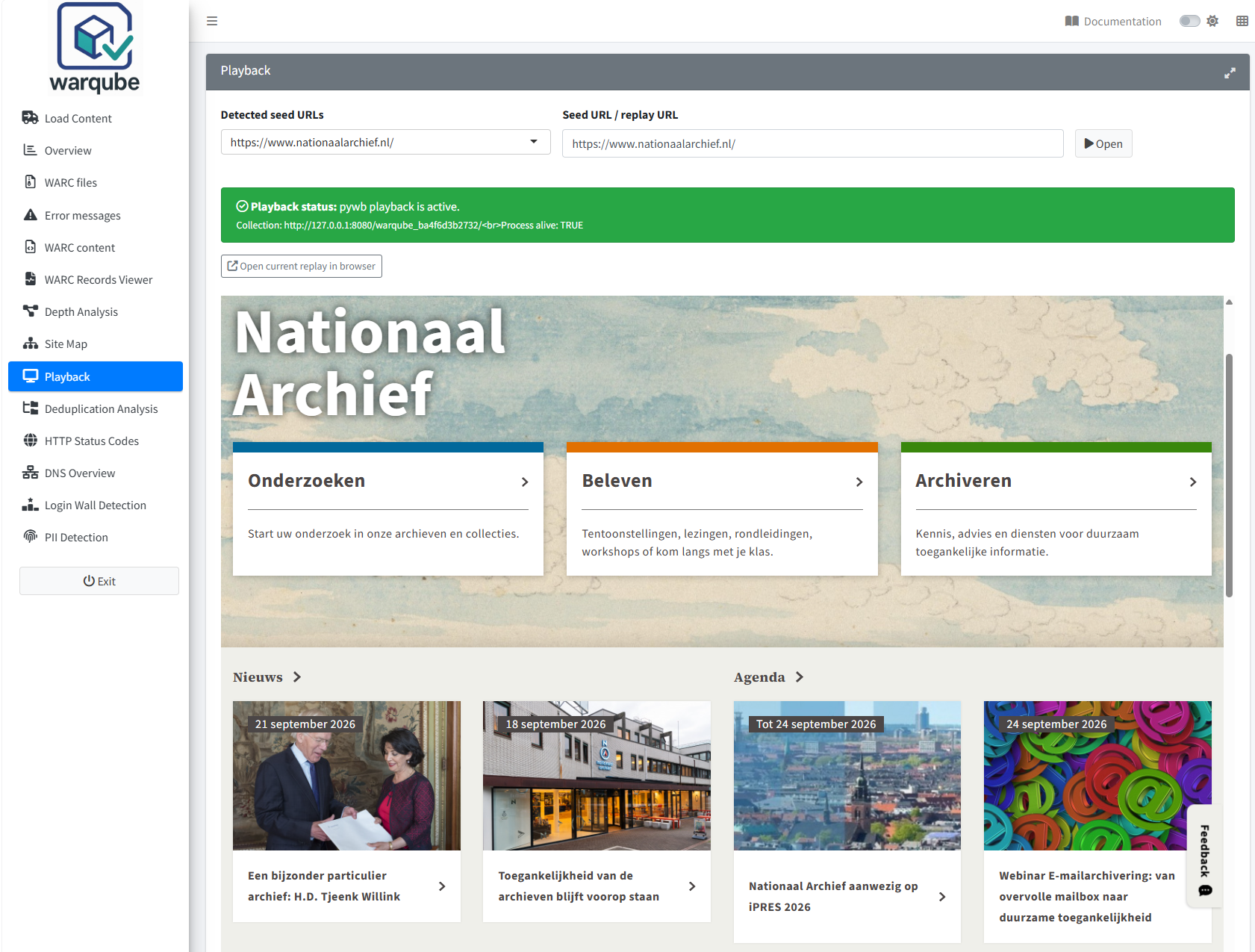
Use Playback to open an archived URL from the loaded web archive. Select a suggested seed URL or enter an original target URL, wait until local playback is active and then select Open.
Purpose
Playback lets you inspect archived web pages as pages rather than as WARC record metadata. Warqube displays the replay in the application and provides a link for opening the same replay in a separate browser tab or window.
Playback is an inspection aid. A page that replays incompletely does not by itself establish whether the relevant records are absent, inaccessible or unsupported.
Requirements
Before opening a replay, confirm that:
- you have completed an analysis or loaded a Warqube database with playback collection information;
- the original WARC directory remains accessible at the location recorded in the database; and
- Playback status reports that local playback is active.
The source directory may be on a local disk or an accessible mapped/network location. Warqube first attempts its normal Windows archive-path setup. Where a directory junction cannot be used, it falls back to the resolved source directory directly. A successful direct fallback is normal and does not copy the complete WARC collection into the Warqube installation. Indexing and replay use the same resolved archive source.
Warqube starts the local playback service while processing a collection and when restoring playback information from an existing database. The interface may display the following message while this happens:
pywb is starting...
Wait for the status to change before selecting Open.
Open a replay
To open a suggested archived page:
- Open Playback.
-
Wait until Playback status displays:
pywb playback is active. - Select a URL under Detected seed URLs.
- Confirm that the URL appears in Seed URL / replay URL.
- Select Open.
- Review the replay displayed below the controls.
Warqube suggests captured HTTP or HTTPS response URLs that have status 200 and HTML recorded as their mimetype or content type. The list contains at most 200 candidate URLs and favours shorter, shallower URLs without query strings.
To open another captured target URL manually:
- Enter the original HTTP or HTTPS target URL in Seed URL / replay URL.
- Select Open.
- Review the replay result.
The field is not validated before Warqube builds the local replay address. Use an original captured target URL rather than assuming that every pasted replay address will be interpreted correctly.
After a replay opens, select Open current replay in browser to open the current local replay address outside the embedded frame. The pywb calendar is available in this browser view, allowing you to choose between available captures of the URL.
Navigate the archived website
To continue browsing:
- Follow a link presented within the replayed page.
- Review whether the destination opens from the loaded playback collection.
- To return to a known page, enter its original target URL in Seed URL / replay URL and select Open again.
Navigation remains within the local replay service. A linked destination can only be replayed when the playback collection can resolve the requested capture and read the associated WARC content.
Warqube does not provide its own capture calendar or date selector in the embedded view. To use the pywb calendar, select Open current replay in browser. The calendar and any other controls shown there belong to pywb, not to the surrounding Warqube dashboard.
Common issues
No collection is loaded
Warqube displays:
No collection loaded.
This means that Playback has no active collection identifier.
- Open Load Content.
- Complete an analysis or load a Warqube database containing collection information.
- Return to Playback.
Warqube can start the local collection when the required collection metadata is available.
Playback is not listening
Warqube displays:
The pywb process may be running, but port 8080 is not listening.
The application did not find a service listening on the local playback port.
- Wait for the playback status to be checked again.
- Retain the message and relevant console output if it persists.
The source code does not provide a user control for restarting the playback service from this page.
During collection processing or database loading, Warqube can also display:
pywb started, but its health check failed (see the console).
pywb did not start correctly while loading the existing database.
pywb did not start correctly; playback was not refreshed.
For any of these messages:
- Retain the exact message and relevant console output.
-
Do not treat playback as available until Playback status reports:
pywb playback is active.
The source code does not provide a confirmed recovery procedure beyond the automatic startup and status checks.
No URL has been opened
Before you choose a URL, the playback area displays:
Choose a seed URL and click Open to start pywb playback.
- Select a suggested URL or enter an original captured target URL.
- Select Open.
The embedded replay frame appears after Warqube has built a replay address.
A page is missing or incomplete
The code does not define a specific Warqube message for a missing replay or missing page resources.
- Confirm that the entered URL matches an archived target URL.
- Try a URL offered under Detected seed URLs.
- Retain the replay address and relevant console output if the problem persists.
The source code does not identify whether an unsuccessful replay is caused by missing captures, inaccessible WARC files or playback behaviour.
A network source is unavailable
Playback continues to depend on the original WARC directory after analysis. If a mapped drive is disconnected, credentials have expired or a network share is temporarily unavailable, reconnect the same source location before trying the replay again. The analytical dashboards can remain available from DuckDB even while playback cannot read the original WARC content.
Limitations
- Playback depends on the local playback service, its collection index and access to the original WARC files.
- Local, mapped and network-backed WARC directories are supported, but their recorded source location must remain available for later playback.
- The suggested URL list is not a complete list of archived URLs. It contains at most 200 status-200 HTML response candidates and excludes URLs ending in several common resource extensions.
- The manual URL field accepts any non-empty text and performs no format or capture-availability validation.
- Warqube uses direct replay mode. The embedded view provides no Warqube capture calendar or date selector; use Open current replay in browser to access the pywb calendar.
- The active status confirms that port 8080 is listening. It does not confirm that the selected collection or requested URL can be replayed successfully.
- Playback can only use content represented in the local collection index and readable from the configured archive location.
- Changing the loaded collection clears the active URL and embedded replay.
- The source code defines no criteria for judging replay completeness or fidelity.
Next steps
Continue to Identifying duplicate files to review repeated payloads and deduplication patterns in the analysed web archive.