Investigating Error Messages
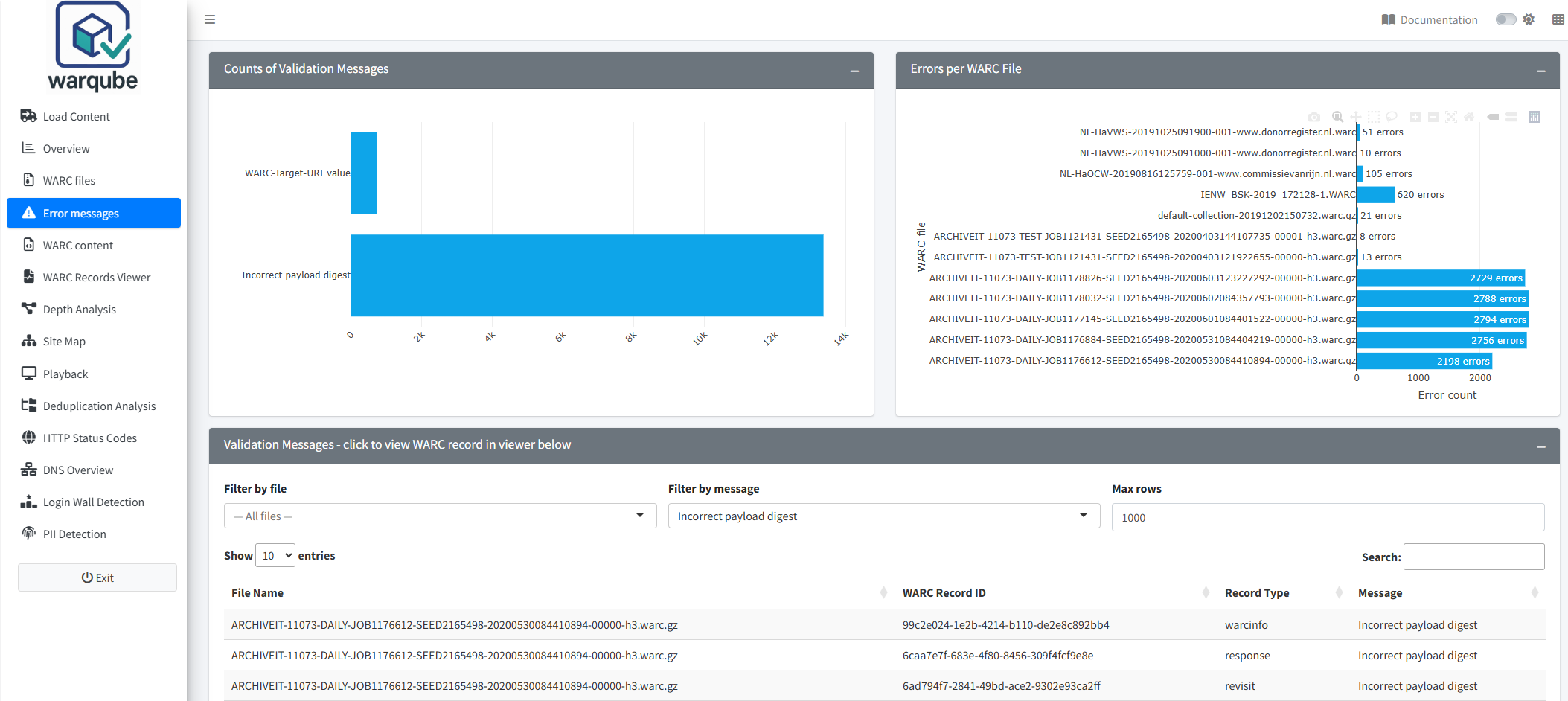
Use the Error messages dashboard to find WARC files with validation messages and inspect records from those files. Start with the two summary charts, then filter the table to focus on a file or message.
Purpose
This dashboard helps you identify recurring validation messages and the WARC files for which they were recorded. It also provides a record viewer for examining headers and payload content from the selected file.
The presence of a validation message identifies a finding to investigate. The dashboard does not prescribe a preservation action or establish that a WARC file cannot be used.
When to use this page
Open Error messages after the Overview or WARC files dashboard shows validation findings. Use it when you need to:
- identify the most frequently recorded messages;
- compare message counts between WARC files;
- find files associated with a particular message; or
- inspect records from a WARC file with validation messages.
Understanding the results
Validation-message summaries
Counts of Validation Messages groups the recorded messages by their short message text. Longer bars represent messages that occur more often.
Errors per WARC File shows the number of recorded messages for each WARC file. Point to a bar to see its count. These are message counts, not counts of distinct affected records.
Validation-message table
Validation Messages - click to view WARC record in viewer below contains the following columns:
- File Name;
- WARC Record ID;
- Record Type; and
- Message.
Use Filter by file to select a WARC file and Filter by message to select an exact short message. Max rows limits the number of returned rows; it starts at 1,000 and accepts values from 100 upwards. The table displays ten rows per page.
If the selected filters return no rows, the table displays:
No results
To recover from this result:
- Set Filter by file to the option for all files.
- Set Filter by message to the option for all messages.
- Review the table again.
The table displays matching rows when the loaded database contains validation messages. If it still displays No results, the source code provides no further explanation in the interface.
Select Refresh Data to update the available file and message choices from the loaded database.
WARC record viewer
The WARC Record Viewer - Records With Validation Messages shows a record from the WARC file represented by the selected table row. It displays the file name, record type, number of records in the file and record headers.
To inspect a record and its payload:
- Select one row in the validation-message table.
- Review the file, record type and headers in the viewer.
- Select Show payload to load and display the beginning of the payload.
- Adjust Number of payload characters to load to change how much of the loaded payload is displayed.
- Select Previous or Next to inspect the adjacent row in the current filtered results.
Before you select Show payload, the viewer displays:
Click 'Show payload' to load content.
The text beside the slider initially estimates the number of available characters from the record’s declared content length. After loading, it shows the measured character count.
Interpreting common findings
- A long bar in Counts of Validation Messages shows a frequently recorded message. It does not show how many distinct files or records are affected.
- A high value in Errors per WARC File means that more messages were recorded for that file. One file can have several messages of the same or different types.
- The same file and message can appear on several table rows because the dashboard combines file-level validation findings with records from that file. Do not interpret repeated rows as separate validation events without checking the underlying file-level counts.
- A missing file name can occur when a recorded message cannot be matched to a file entry. The dashboard does not explain the cause.
- The message text shown in the dashboard is a shortened description. The dashboard does not display the stored severity or complete message text.
Limitations
- Warqube records these validation messages against a WARC file, not against a specific WARC record.
- A table row does not prove that its displayed WARC Record ID caused the accompanying message. The record belongs to the same WARC file, but the code does not establish a message-to-record relationship.
- The summary charts and table do not display the stored message severity or complete validation-message text.
- Max rows can prevent later matching rows from appearing in the table.
- The record viewer displays only the number of payload characters selected with the slider. It does not interpret or validate the payload.
- The source code does not define which messages require corrective action or how a source WARC file should be repaired.
Related dashboards
- Understanding the Overview dashboard shows the total number of validation messages and collection-level validation counts.
- Inspecting WARC files shows each file’s recorded validation status and descriptive information.
- Inspecting archived records provides a separate viewer for browsing records in the loaded web archive.
Next steps
Continue to Inspecting archived records when you need to examine WARC records independently of the validation-message results.