Exploring HTTP status codes
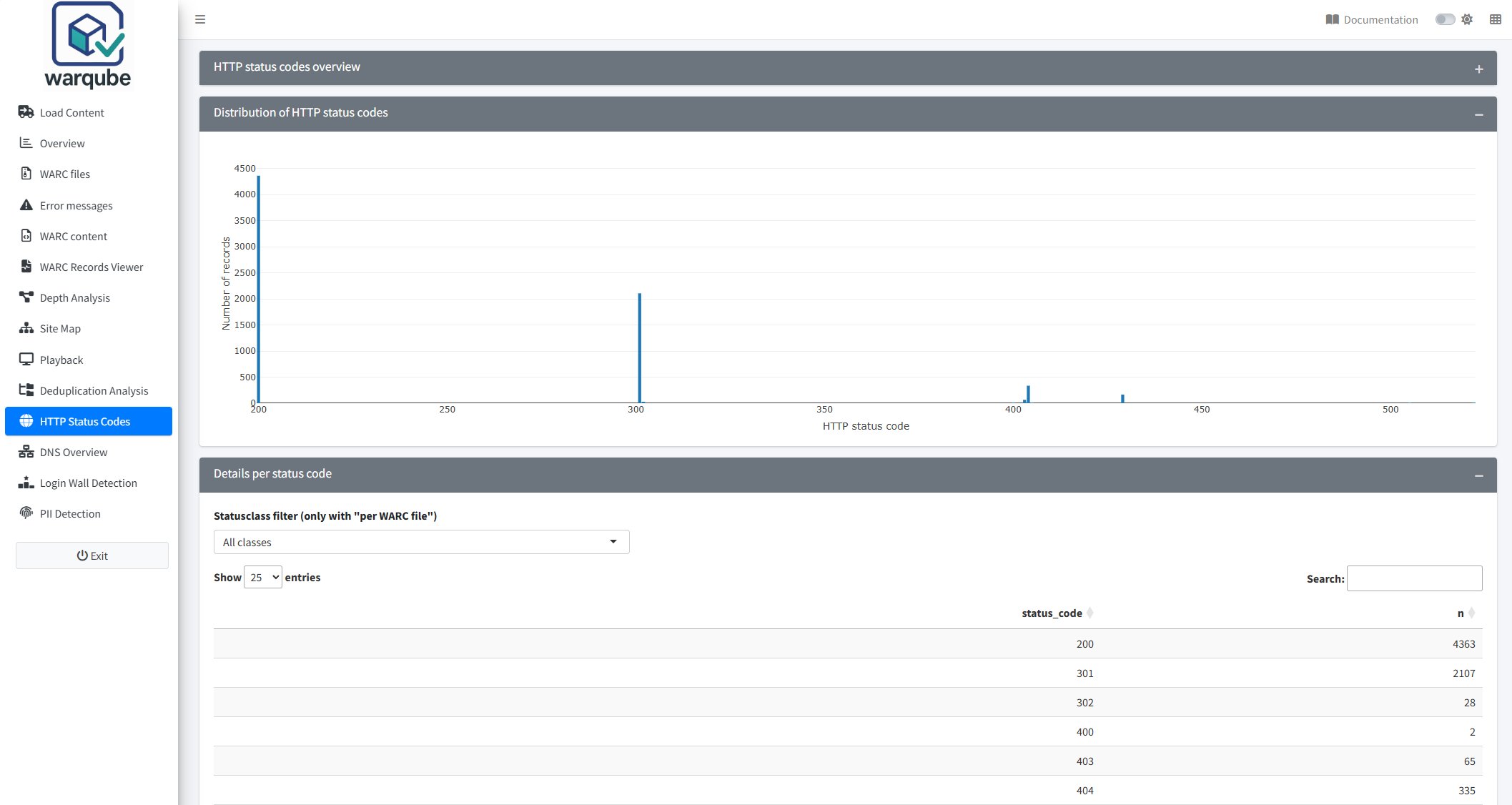
Use HTTP Status Codes to see which HTTP status codes occur in the archived response records. Start with the overall distribution, then group the results by WARC file or status-code class when you need more detail.
Purpose
This dashboard helps you identify the responses recorded during a crawl. You can recognise successful responses, redirects and client or server errors, and compare their distribution across WARC files.
When to use this page
Open HTTP Status Codes when you need to:
- review the distribution of individual HTTP status codes;
- compare status-code counts between WARC files;
- summarise responses by status-code class; or
- identify status codes that may require further investigation.
Understanding the results
Choose a grouping
- Open HTTP Status Codes.
- Under Grouping, select the view that answers your question.
- Select Logarithmic Y-axis if large differences between counts make smaller bars difficult to compare.
- Review Distribution of HTTP status codes and Details per status code.
The results update when you change a setting. The available groupings are:
- Status code, which counts response records for each individual status code;
- Status code per WARC file, which divides each status-code bar by WARC file; and
- Status class (2xx/3xx/…), which combines status codes into 1xx, 2xx, 3xx, 4xx, 5xx and Other/Unknown classes.
In Status code per WARC file, the chart stacks the counts for the WARC files. Point to a section of a bar to see the WARC file, status code and record count.
Use the details table
Details per status code shows the values used for the selected grouping. The table initially displays 25 rows per page. You can search, sort and choose to display 10, 25, 50 or 100 rows per page.
To filter the table by status-code class:
- Under Grouping, select Status code per WARC file.
- Under Statusclass filter (only with “per WARC file”), select a class.
- Review the filtered rows in Details per status code.
This filter affects only the table. It does not change Distribution of HTTP status codes. With either of the other groupings, the filter has no effect.
Warqube uses these ranges:
| Class | Status-code range | General meaning |
|---|---|---|
| 1xx | 100–199 | Informational response |
| 2xx | 200–299 | Successful response |
| 3xx | 300–399 | Redirection response |
| 4xx | 400–499 | Client-error response |
| 5xx | 500–599 | Server-error response |
| Other/Unknown | Outside 100–599 | A recorded value outside the standard classes |
These meanings describe the status-code classes. Use the individual status code and the archived context when you need to understand a specific response.
Interpreting common findings
- A large 2xx count means that many response records contain a successful status code. It does not establish that every archived page is complete or can be replayed successfully.
- A large 3xx count indicates many redirect responses. The dashboard does not show whether each redirect target was captured.
- A 4xx response records a client-error status returned during the crawl. The dashboard does not identify the cause.
- A 5xx response records a server-error status returned during the crawl. The dashboard does not establish whether the error was temporary or persistent.
- A status code concentrated in one WARC file can help you narrow an investigation to that file. Counts represent records, not distinct URLs.
- Other/Unknown contains non-empty status values outside 100–599. It does not contain records whose status code is missing.
- A logarithmic Y-axis can make small and large counts easier to compare in one chart. Read the scale carefully because equal visual intervals do not represent equal numerical increases.
If the analysis contains no response records with a status code, the chart remains empty and the table displays:
No HTTP status codes found. Check whether the HttpStatus column is populated during import.
The message states that no HTTP status codes were found. The source code does not provide an end-user recovery procedure or identify whether the source WARC files lack the values. Retain the message and relevant console output when reporting the problem.
Limitations
- The dashboard includes response records only. It excludes other WARC record types.
- Records without an HTTP status code do not appear in the chart or table.
- Counts represent WARC response records, not unique URLs, unique payloads or successful page loads.
- The status-code class describes the server response. It does not determine capture completeness, content quality or replay quality.
- Statusclass filter (only with “per WARC file”) changes only the table and works only with Status code per WARC file.
- If the status-class filter returns no matching rows, the table is empty and Warqube displays no explanatory message.
- The dashboard does not list the target URLs associated with a status code.
- The source code defines no expected or acceptable distribution of HTTP status codes.
Related dashboards
- Investigating Error Messages presents messages found in archived response content.
- Inspecting archived records lets you examine individual record metadata, including its HTTP status.
- Identifying duplicate files can filter its payload comparisons by HTTP status-code class.
Next steps
Continue to Exploring captured DNS lookups to review DNS records stored in the web archive.