Detecting personally identifiable data
Use PII Detection to review text fragments that Warqube has identified as possible personally identifiable information (PII). Treat every detected entity as a candidate that requires review; the dashboard does not confirm that the text is personal information.
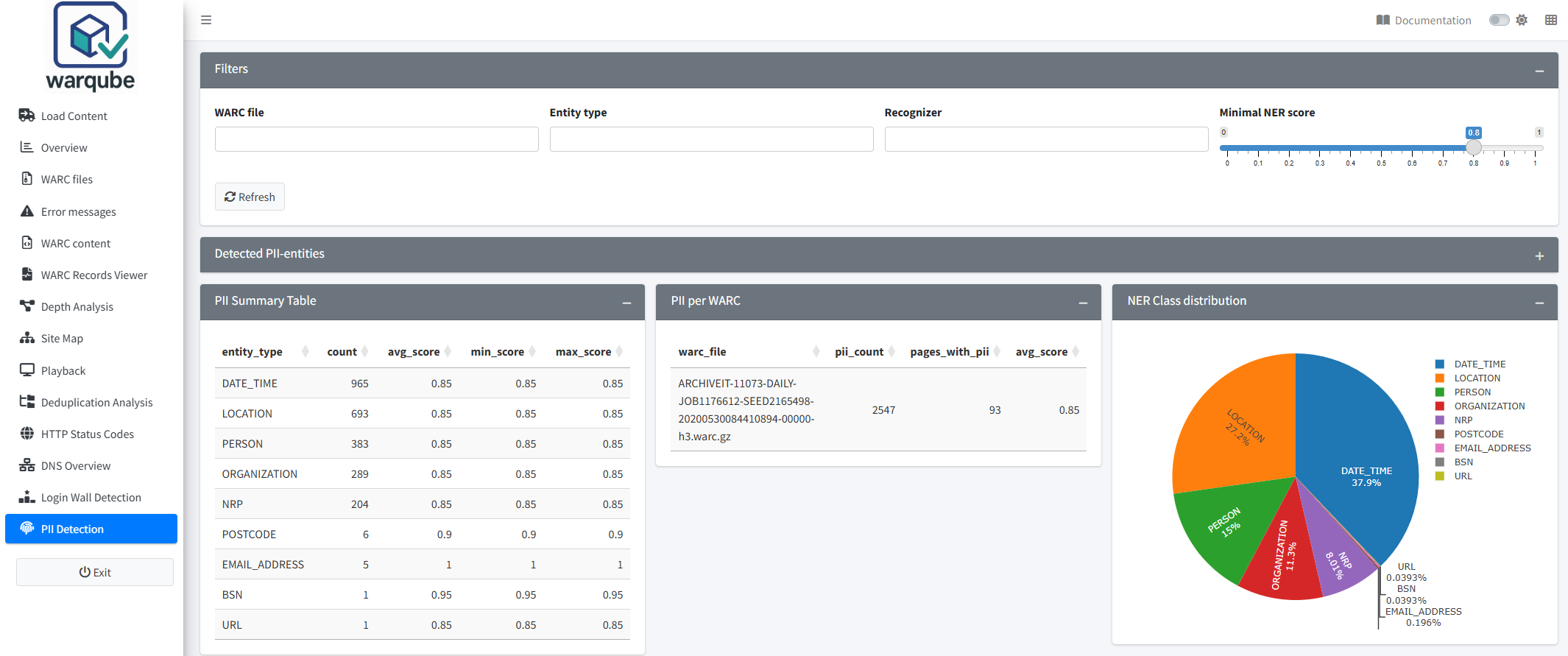
The screenshot illustrates the dashboard layout. Entity types, recognisers, counts and scores are data-driven and differ between collections.
Purpose
This dashboard helps you locate possible PII in text extracted from archived HTML responses. You can filter the candidates by WARC file, entity type, recogniser and score, then compare counts by entity type, WARC file and date.
When to use this page
Open PII Detection when you need to:
- review the text fragments stored for detected entities;
- focus on one or more WARC files;
- examine particular entity types or recognisers;
- exclude candidates below a selected score; or
- compare candidate counts and scores across WARC files or dates.
Understanding the results
Review the initial results
Warqube performs PII detection while it processes a WARC directory. Opening the dashboard or selecting Refresh does not run the detection again.
The dashboard initially includes all available WARC files, entity types and recognisers, but excludes stored candidates with a score below 0.80.
To review the results:
- Open PII Detection.
- Review Detected PII-entities to see the individual candidates.
- Compare PII Summary Table and PII per WARC.
- Review NER Class distribution and NER Score Trend.
The entity and recogniser choices come from the values stored in the loaded Warqube database. The source code does not define a fixed set that must appear in every analysis.
How candidates are recognised
Warqube combines three kinds of recognition:
- Structured recognition identifies formatted Dutch candidates such as postcodes, mobile numbers, context-supported landline numbers and IBANs. IBAN candidates must also pass checksum validation.
- Presidio recognition supplies the analysis framework and recognisers for structured entities such as email addresses, IP addresses and URLs.
- Dutch spaCy recognition provides linguistic entity recognition where context is relevant, including candidate names, organisations and locations.
Not every entity is produced by spaCy or another probabilistic language model. Pattern matches can also be false positives, and linguistic recognition can miss or misclassify text. The recogniser name and score help interpret a candidate; neither confirms that it is legally personal data.
Dutch postcode recognition
Postcode recognition is performed entirely offline during WARC analysis:
- Warqube finds a syntactically plausible Dutch PC6 candidate.
- It normalises letter case and whitespace without changing the stored text position.
- It checks the normalised value against a bundled postcode corpus derived from the official CBS 2015 v2 and 2025 v1 snapshots.
- It stores the candidate with explicit provenance and confidence.
The frozen corpus contains 468,933 unique PC6 values. It is bundled with the Warqube release; analysis makes no CBS or PDOK API call and a running instance does not update the corpus silently. The source data has its own attribution and licensing conditions, separate from Warqube’s GPLv3 code licence. See the postcode resource notice for source details and maintainer regeneration instructions.
| Recogniser | Stored score | Meaning |
|---|---|---|
DutchPostcodeRecognizer.CBSKnown | 0.95 | The normalised PC6 occurs in at least one bundled CBS-derived snapshot. |
DutchPostcodeRecognizer.Unconfirmed | 0.50 | The candidate is syntactically plausible but is absent from the available corpus, or the corpus could not be used. |
CBSKnown confirms corpus membership only. It does not establish that the text is personal data or that the postcode was valid on the WARC capture date. The corpus intentionally combines two reviewed snapshots rather than every year, and it does not cover every historical, recent or special-delivery code. For that reason, Unconfirmed means lower-confidence candidate, not invalid postcode. Because the dashboard initially filters out scores below 0.80, lower the score filter to 0.50 to review unconfirmed postcode candidates.
Filter the candidates
To narrow the results:
- Under WARC file, select one or more files, or leave the field empty to include all files.
- Under Entity type, select one or more types, or leave the field empty to include all types.
- Under Recognizer, select one or more recognisers, or leave the field empty to include all recognisers.
- Set Minimal NER score between 0 and 1.
- Review the updated tables and charts.
The filters update the results automatically. Minimal NER score includes candidates with a score equal to or higher than the selected value.
Select Refresh to reload the available filter choices and dashboard data. Warqube clears the selected WARC-file, entity-type and recogniser filters when it reloads those choices. It retains the selected minimum score and displays:
PII dashboard refreshed
Review individual candidates
Detected PII-entities contains:
- the identifier of the extracted HTML text;
- the WARC file, target URL, record date and language value;
- the PII indicators stored for the extracted text;
- the detected entity type and its start and end positions;
- the matched text fragment;
- the candidate score; and
- the recogniser that returned the candidate.
The table initially displays 25 rows per page. Use the filters at the top of its columns to narrow the displayed rows. You can also sort the columns and scroll horizontally.
The has_pii, pii_types and pii_entity_count columns describe all candidates stored for that extracted text when it was processed. They do not recalculate when you change the dashboard filters and can therefore differ from the currently displayed candidate rows.
Review the summaries
PII Summary Table groups the filtered candidates by entity type. It shows the candidate count and the average, minimum and maximum score for each type.
PII per WARC groups the filtered candidates by WARC file. It shows the candidate count, the number of distinct extracted HTML texts containing those candidates and their average score.
Both summary tables display at most 20 rows. The interface provides no paging controls for additional rows.
NER Class distribution presents the filtered candidate count and percentage for each entity type. Point to a segment to see its type, count and percentage.
NER Score Trend groups candidates by the date stored with the extracted HTML text. It plots the minimum, average and maximum score for each date. Texts without a date do not appear in this chart.
Interpreting common findings
- A candidate with a higher score received a stronger score from its recogniser. The source code does not define the score as a probability or a threshold that confirms PII.
- Several candidates in one extracted text represent separately stored detections. Candidate count is not a count of people.
- A WARC file with many candidates can help you focus further review on that file. The dashboard does not adjust the count for file size or number of HTML responses.
- A dominant entity type means that the selected filters return more candidates of that type. It does not establish that every match is correct.
- A change in the score trend describes the stored candidate scores on each date. It does not measure the amount of PII because the chart does not plot candidate counts.
- Lowering Minimal NER score can reveal more stored candidates. Raising it hides candidates below the selected score and does not prove that the remaining candidates are correct.
If no candidates match the current filters, NER Class distribution displays:
No data available for the current filters.
NER Score Trend displays:
No trend data available for the current filters.
The detail and summary tables remain empty without a separate message.
To broaden the results:
- Lower Minimal NER score.
- Clear one or more selections under WARC file, Entity type or Recognizer.
- Review the updated tables and charts.
Limitations
- Detection covers text extracted from response records whose HTTP content type contains
html. It does not scan non-HTML payloads, scripts, styles or WARC metadata for PII. - Warqube removes HTML tags before detection. The dashboard does not provide the original HTML context around a candidate.
- The detection language is configured as Dutch. The source code does not confirm equivalent detection quality for content in other languages.
- Warqube processes all eligible extracted texts in bounded batches of 100; 100 is a batch size, not a collection-wide limit. Texts with no candidates are marked complete so they are not left pending indefinitely.
- Only candidates with a score of at least 0.5 are stored during processing. Setting Minimal NER score below 0.5 cannot reveal candidates that were discarded before storage.
- If detection fails for an individual text, Warqube reports a warning and leaves that text pending for a later retry instead of recording an empty successful result. The dashboard does not provide a retry control.
- Pattern-based candidates can match formatted numbers or text that is not personal information. Other recognisers can also return false positives or miss relevant text.
- Candidate counts represent detected fragments, not people, unique values or affected WARC records.
- The dashboard cannot rerun detection, change the recognisers or add entities that were not stored during processing.
- The source code defines no score that confirms PII and no expected or acceptable candidate count.
Related dashboards
- Inspecting archived records lets you examine WARC record metadata associated with a candidate.
- Exploring archived content shows which content types and records are present in the web archive.
- Detecting login walls identifies target URIs that contain configured login-related terms.
Next steps
Continue to Inspecting archived records to examine the WARC records associated with candidates that require further review.