Overview
Use the Overview dashboard to check the scope and general condition of the loaded web archive. It summarises the WARC files, validation messages, crawl dates and filename compliance so that you can decide what to examine next.
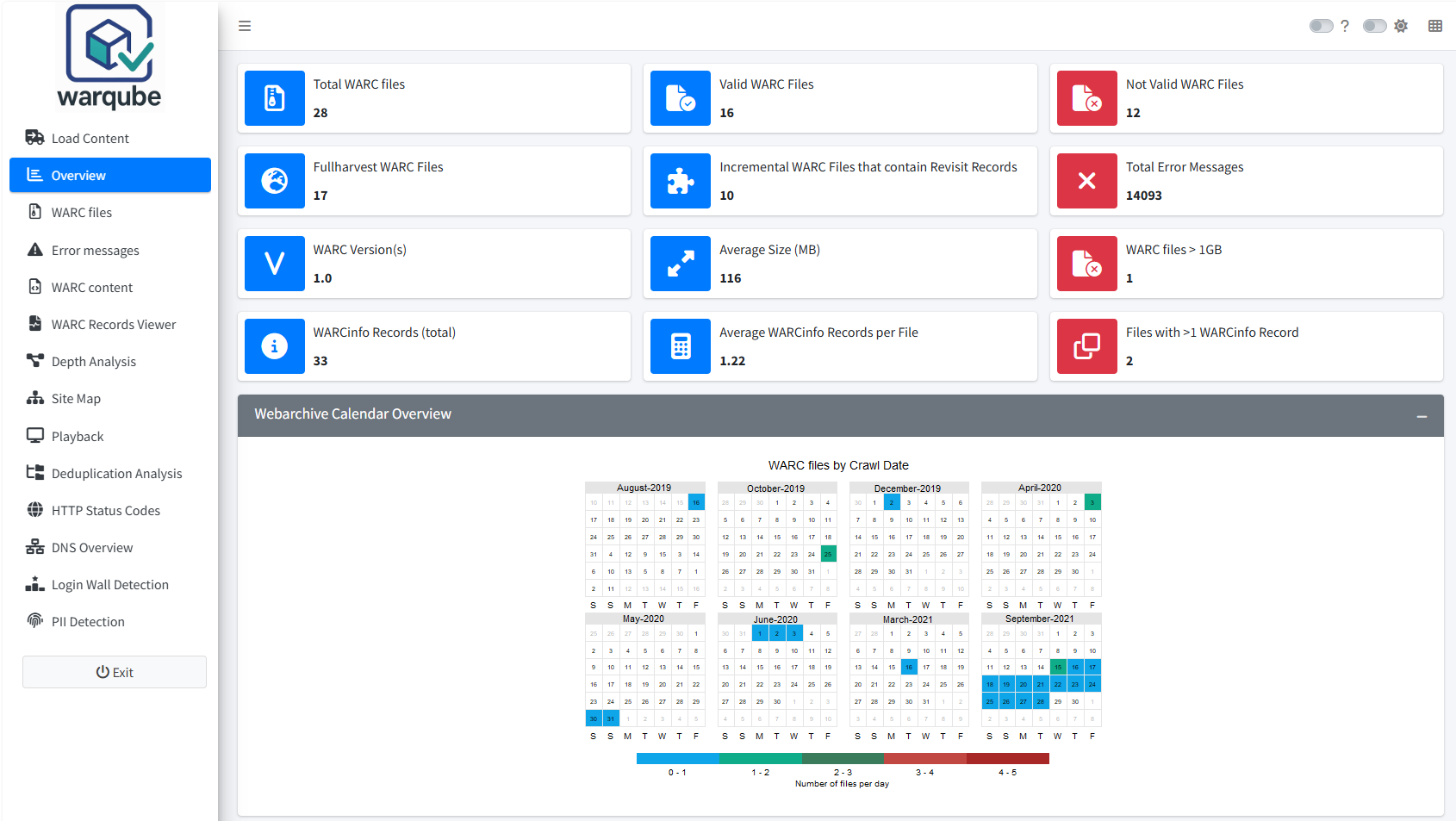
The screenshot shows one example collection. The displayed record types and counts come from the loaded analysis and are not fixed application values.
Purpose
The dashboard helps you confirm that Warqube has analysed the expected files and highlights findings that may require closer inspection. It provides a starting point for reviewing results; it does not replace the detailed dashboards.
When to use this page
Open Overview after Warqube has finished processing a WARC directory or after you have loaded an existing Warqube database. Use it before examining individual WARC files, validation messages or archived content.
Understanding the results
Collection scale
The first row describes the size and record composition of the collection:
| Result | Meaning |
|---|---|
| Total WARC files | The authoritative number of WARC files recorded in the analysis. |
| Total WARC Records | The number of rows already indexed by warcio and stored in WarcInhoud. Opening Overview does not rescan the WARC files. |
| Average Records per WARC | Total indexed WARC records divided by Total WARC files. |
| Records by WARC-Type | A data-driven breakdown of indexed records by the WARC-Type values found in the collection. Missing or empty values are shown as unknown. |
The WARC-Type breakdown can include warcinfo. This describes the composition of the complete record population. The separate WARCinfo checks under File checks describe potentially notable file-level structure, so the two results answer different questions.
Validation, capture profile and file checks
The remaining metrics are grouped by their purpose:
| Result | Meaning |
|---|---|
| Valid WARC Files | The number of files classified as well-formed and valid. |
| Not Valid WARC Files | The number of files classified as not well-formed. |
| Fullharvest WARC Files | The number of indexed WARC files that do not contain a revisit record. |
| Incremental WARC Files that contain Revisit Records | The number of WARC files that contain at least one revisit record. |
| Total Error Messages | The total number of validation messages recorded across the WARC files. |
| WARC Version(s) | The distinct WARC versions found in the analysis. |
| Average Size (MB) | The average WARC file size in megabytes. |
| WARC files > 1GB | The number of WARC files larger than 1 GB. |
| Average WARCinfo Records per File | The average number of WARCinfo records among files that contain them. |
| Files with >1 WARCinfo Record | The number of files containing more than one WARCinfo record. |
Crawl calendar
Webarchive Calendar Overview shows the number of WARC files for each available crawl date. Use it to recognise periods with recorded crawl activity and to spot dates that you may want to investigate.
For a period longer than 24 months, Warqube may display:
WARNING: Empty months are removed from the calendar because the plot spans more than 24 months.
This warning means that the calendar omits months without recorded activity to keep the long date range readable. You do not need to take any action.
WARC filename compliance
The filename section reports WARC Filenames Compliant and WARC Filenames Non-Compliant. Expand Filename Format (Guideline Nationaal Archief) to see the naming pattern used by Warqube. Expand Compliant Filenames or Non-Compliant Filenames to inspect the relevant files.
Filename compliance concerns the filename format only. It does not indicate whether the content of a WARC file is valid.
Interpreting common findings
- A value under Not Valid WARC Files identifies files classified as not well-formed. Open the detailed WARC file and validation-message dashboards before drawing conclusions about the cause.
- Total Error Messages counts individual messages, not affected files. One WARC file can therefore contribute more than one message.
- The full-harvest and incremental counts distinguish files by whether they contain revisit records. They do not confirm how the original crawl was configured.
- Records by WARC-Type reflects the types actually indexed in this collection; the set of labels is not fixed.
- Several values under WARC Version(s) show that the analysis contains more than one WARC version. Review the individual files if that mixture is unexpected.
- A value under WARC files > 1GB identifies files for closer inspection; the source code does not define a recommended maximum WARC file size.
- A non-compliant filename means that it does not match the format shown in the dashboard. It does not mean that Warqube failed to process the file.
- Gaps in the crawl calendar show that no WARC files with those crawl dates appear in the calendar. The dashboard alone cannot confirm whether the web archive itself has a collection gap.
Limitations
- The dashboard provides totals, averages and a record-type composition, not file-level evidence.
- Not Valid WARC Files specifically counts files classified as not well-formed; it must not be read as a count of every possible validation status.
- The crawl calendar excludes files for which no crawl date is available.
- For periods longer than 24 months, the calendar removes empty months.
- Warqube derives the full-harvest and incremental categories from the absence or presence of revisit records. These labels do not establish the intent of the crawl.
- The filename check tests the displayed naming format only. It does not test WARC validity or content quality.
- The source code does not define acceptable thresholds for validation messages, file sizes, WARCinfo records or crawl frequency. Interpret these results in the context of your collection and preservation requirements.
Related dashboards
- Inspecting WARC files provides file-level details, including validation status, size and crawl date.
- Investigating validation errors provides the recorded validation messages.
- Exploring archived content helps you examine the records stored in the web archive.
Next steps
Continue to Inspecting WARC files to review individual files and investigate the findings summarised on Overview.