Exploring captured DNS lookups
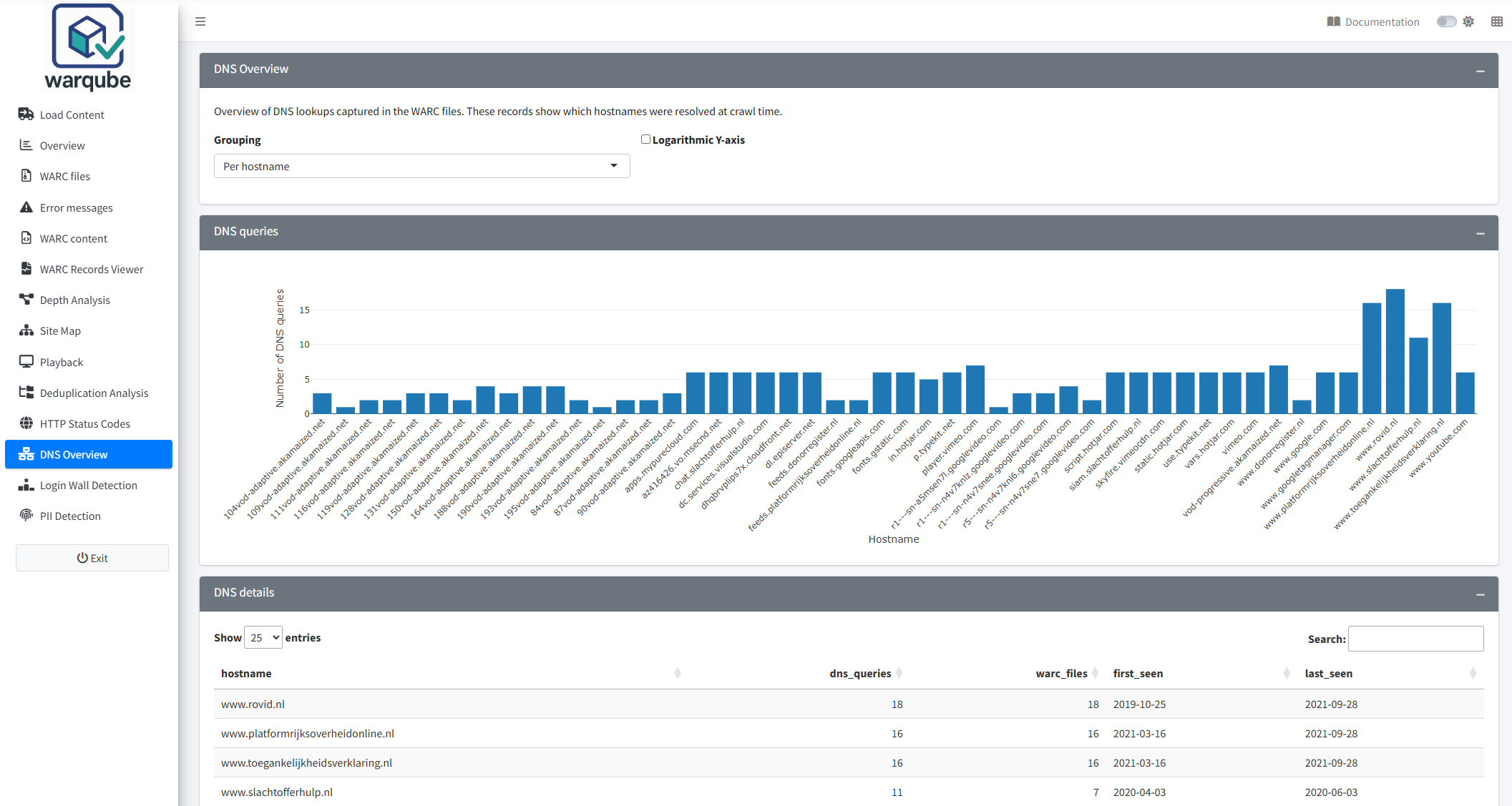
Use DNS Overview to review DNS-related response records in the web archive. Start with the hostname view, then group the results by crawl date or WARC file when you need to compare where and when the records occur.
Purpose
This dashboard helps you identify the hostnames recorded in captured DNS lookups and compare the number of DNS-related response records across crawl dates and WARC files.
When to use this page
Open DNS Overview when you need to:
- find frequently recorded hostnames;
- see how many WARC files contain records for each hostname;
- compare DNS-related record counts across crawl dates; or
- compare DNS-related record counts and hostname counts across WARC files.
Understanding the results
Choose a grouping
- Open DNS Overview.
- Under Grouping, select the view that answers your question.
- Select Logarithmic Y-axis if large differences between counts make smaller values difficult to compare.
- Review DNS queries and DNS details.
The results update when you change a setting. Warqube provides three groupings.
Per hostname
Per hostname counts DNS-related response records for each recorded hostname. The table also shows the number of WARC files containing those records and the first and last associated crawl dates.
The chart displays the 50 hostnames with the highest record counts. Point to a bar to see the hostname, record count and number of WARC files. Use DNS details to review all returned hostnames, including those not shown in the chart.
For target URIs beginning with dns:, Warqube removes that prefix when it displays the hostname. If a record is included because its content type begins with text/dns but its target URI does not begin with dns:, the target URI is used unchanged as the hostname value.
Per crawl date
Per crawl date shows the number of DNS-related response records and the number of distinct hostname values for each crawl date. The chart connects the dates with a line. Point to a marker to see the date, record count and distinct hostname count.
Per WARC file
Per WARC file shows the DNS-related response-record count and distinct hostname count for each WARC file. The table also shows the first and last associated crawl dates. Point to a bar to see the file name and both counts.
DNS details initially displays 25 rows per page. You can search, sort and choose to display 10, 25, 50 or 100 rows per page. Scroll horizontally when the table is wider than the available space.
Interpreting common findings
- A high count for one hostname means that many matching response records have that hostname value. It does not represent the number of distinct DNS answers or IP addresses.
- A hostname found in several WARC files shows that matching records occur across those files. It does not establish that every lookup succeeded.
- A rise or fall in the per-date chart shows a change in the number of matching response records. Differences in the number or contents of the WARC files can also affect the count.
- A WARC file with many DNS-related records can help you narrow further inspection to that file. The count alone does not indicate whether the DNS information is complete or correct.
- A logarithmic Y-axis can make small and large counts easier to compare in one chart. Read the scale carefully because equal visual intervals do not represent equal numerical increases.
If Warqube finds no matching records, the chart remains empty and the table displays:
No DNS-records found (ContentType 'text/dns' or WarcTargetUri 'dns:' not present).
The message means that the loaded analysis contains no response records with a content type beginning with text/dns or a target URI beginning with dns:. The source code provides no recovery action that can create missing DNS records after processing.
Limitations
- The dashboard includes response records only.
- Warqube identifies DNS-related records from a content type beginning with
text/dnsor a target URI beginning withdns:. It does not inspect the payload to confirm that it contains a valid DNS response. - The dashboard displays recorded hostname values. It does not parse or show resolved IP addresses, DNS record types, response codes or time-to-live values.
- Counts represent matching WARC response records, not unique lookup events, successful resolutions or distinct DNS answers.
- The dashboard includes only records whose WARC file name matches a file in the file-level data used by Warqube.
- The hostname chart is limited to the 50 highest record counts. The table is not limited to those 50 hostnames.
- First and last seen values use the crawl date associated with each WARC file, not a timestamp extracted from the DNS payload.
- Missing target URIs or crawl dates can produce missing or non-date values in grouped results. Warqube provides no explanatory message for these values.
- The source code defines no expected or acceptable number of DNS-related records.
Related dashboards
- Inspecting WARC files provides the crawl dates and other file-level information associated with the DNS results.
- Inspecting archived records lets you examine the metadata of individual WARC records.
- Exploring HTTP status codes summarises status codes found in archived response records.
Next steps
Continue to Detecting login walls to examine response records for signs of login or access barriers.